![TD_Logotype_White_RGB.png]](https://knowledge.tradedoubler.com/hs-fs/hubfs/TD_Logotype_White_RGB.png?height=40&name=TD_Logotype_White_RGB.png)
To identify which affiliates are actively promoting your program, you can use the Statistics section in your platform.
Step-by-step:
-
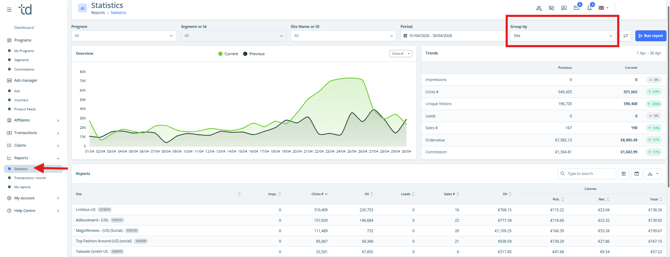
Go to the Reports, Statistics section.
-
Apply a grouping by Site (affiliate).
-
Review the performance data for each affiliate.
How to interpret the data:
-
Affiliates showing impressions and/or clicks are considered active.
-
An affiliate does not need to generate sales to be active - traffic activity alone (impressions/clicks) indicates they are promoting your program.
Important note:
It is possible for affiliates to be active but not yet generating conversions. This can happen for several reasons, such as early-stage promotion, audience mismatch, or low conversion rates.
Tracking validation:
If you want to ensure your tracking is working correctly, it is recommended to perform a test sale. This allows you to confirm that conversions are being recorded accurately in your affiliate marketing program.